.webp)

.jpg)
 ChatGPT
 Perplexity
 Gemini
 Grok
Grok
 Claude
For years, proposals meant one thing: a PDF attached to an email. You spent hours writing, formatting, and proofreading. Then you exported to PDF, hit send, and hoped for the best. The problem with this approach is not the content. It is the format. A PDF is a one-way, static document. Your client downloads it, scrolls through it, and closes it. There is no interaction, no feedback loop, and no data on what happened next.
Interactive proposals change this fundamentally. Instead of sending a file, you send a link. Your client opens a branded web page where your proposal comes alive with dynamic pricing tables, embedded videos, real-time content updates, and built-in acceptance flows. You get notified the moment they open it, see which sections they spend time on, and know when they share it with their team.
This is not a minor upgrade. It is a shift in how proposals function in the sales process. This guide explains what interactive proposals are, why they outperform static documents, and how to create them for your business.
What Are Interactive Proposals?
An interactive proposal is a web-based document that your client views through a browser link instead of downloading a file. Unlike a PDF or Word document, an interactive business proposal includes dynamic elements that the reader can engage with.
Dynamic pricing tables
Instead of a fixed price list, your client can select options, add or remove line items, and see the total update in real time. This eliminates the back-and-forth emails that happen when a prospect wants to adjust scope. With an interactive proposal software, the pricing section becomes a conversation, not a take-it-or-leave-it number.
Embedded media
Videos, animations, and interactive graphics can be embedded directly in the proposal. A video introduction from the project lead, a walkthrough of your proposed solution, or a client testimonial playing inline creates a richer experience than any PDF can deliver.
Real-time tracking
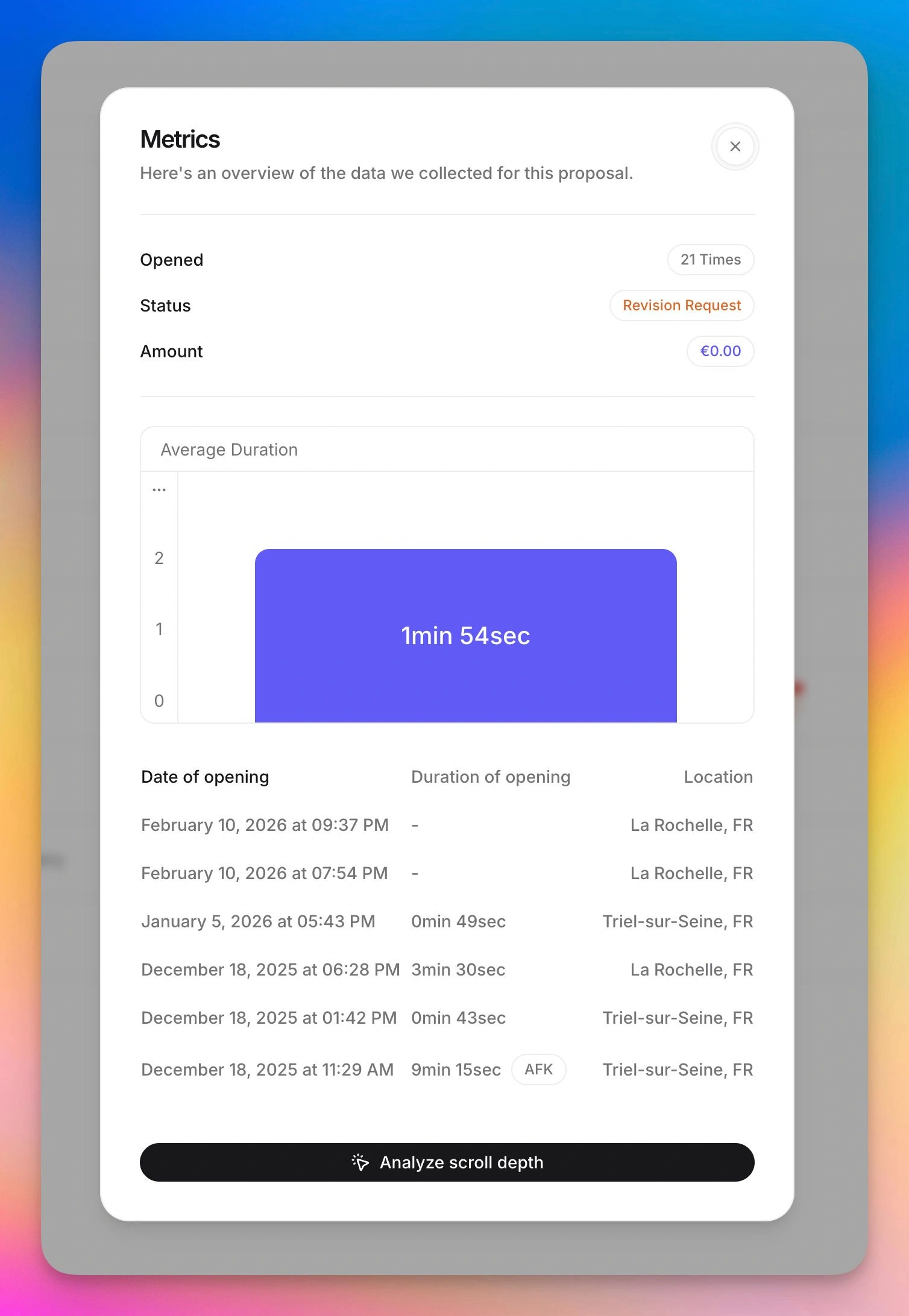
When you send an interactive proposal, you know exactly when the client opens it, which sections they read, how long they spend on each part, and whether they forward the link to colleagues. This tracking data transforms your follow-up strategy from guesswork into precision. Learn more about how proposal tracking works and why it matters.
Built-in acceptance and payments
The client can accept the proposal and sign electronically without leaving the page. Some interactive proposal software tools also integrate payment collection, so the client can read, accept, sign, and pay in a single flow. This eliminates the friction of switching between email, phone, and bank transfers.
Live updates
Made a mistake in the pricing? Need to adjust a deliverable after a conversation? With interactive proposals, you update the content in real time. The link stays the same, but the content is always current. No more "please disregard the previous version" emails.
Why Interactive Proposals Outperform PDFs
The shift from static to interactive proposals is not about technology for its own sake. It is about measurable business outcomes.
Higher open rates
PDF attachments face a gauntlet of obstacles: spam filters, download hesitation, file format compatibility, and the simple friction of opening an attachment. Web-based proposals sent as links bypass all of these. A click opens the proposal instantly in the browser. Data from proposal software providers consistently shows that link-based proposals achieve 30-40% higher open rates than PDF attachments.
Longer engagement time
Static documents get scanned in a linear, top-to-bottom pass. Interactive elements break this pattern. When a client can click, explore, toggle pricing options, and watch an embedded video, they engage more deeply with the content. Studies from interactive proposal software providers show that proposal engagement times increase by 40-60% compared to static PDFs.
Better conversion rates
The combined effect of higher open rates, deeper engagement, and reduced friction in the acceptance process translates to better conversion rates. Teams that switch from PDF proposals to interactive proposals typically report a 15-25% improvement in close rates within the first quarter.
Faster deal cycles
When a client can review, sign, and pay without leaving the proposal page, the time between "proposal sent" and "deal closed" shrinks dramatically. No waiting for a printed signature to arrive by mail. No separate invoice email. No bank transfer delay. The deal closes when the client is ready, not when the administrative process catches up.
Professional brand impression
An interactive business proposal that loads as a branded web page makes a different first impression than a PDF attachment. It signals that your business invests in client experience, that you are technologically current, and that working with you will be smooth and modern. For agencies and freelancers selling creative or digital services, this alignment between what you sell and how you sell it matters.
How to Create Interactive Proposals: A Practical Guide
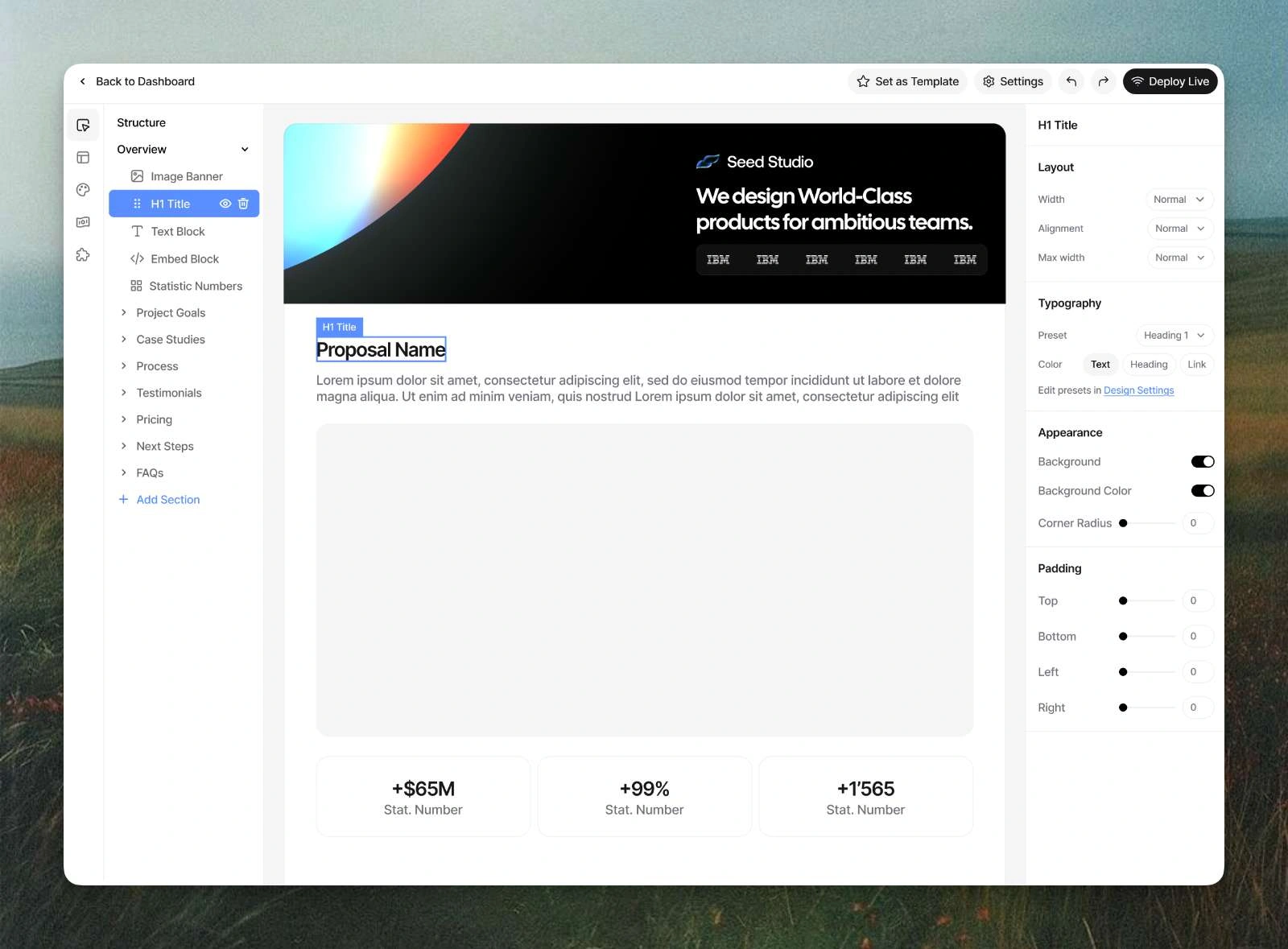
Creating interactive proposals does not require coding skills or a design team. Modern online proposal tool platforms handle the technical complexity behind a visual editor.
Step 1: Choose the right tool
The interactive proposal software market includes several options. The right choice depends on your priorities:
For agencies and freelancers who want fully branded web-based proposals with tracking, payments, and design flexibility, Propal.io is built specifically for this use case. Every proposal becomes a unique web page that matches your brand.
For sales teams that need proposals within a broader document management platform, PandaDoc and Proposify offer interactive proposals as part of a larger feature set. Compare them in our guide to Proposify alternatives and PandaDoc alternatives.
For teams already using Qwilr, explore how other Qwilr alternatives approach the web-page proposal concept.
Step 2: Structure your content for interaction
An interactive proposal follows the same logical structure as a good PDF proposal (context, solution, pricing, terms), but each section should be designed to leverage the interactive format.
Introduction section: Add a brief video introduction instead of (or in addition to) written text. A 60-second video from the project lead creates a personal connection that text alone cannot achieve.
Solution section: Use expandable blocks or tabs to organize detailed information without overwhelming the reader. Let the client click into the details they care about and skip the ones they do not.
Pricing section: Build a dynamic pricing table where the client can select options and see the total update. If you offer multiple packages, let the client toggle between them. This transforms pricing from a static number into an exploration.
Social proof section: Embed client testimonial videos or link to case studies that open in context, not in a new tab. Keep the reader inside the proposal experience.
Acceptance section: Include a clear call-to-action button, an e-signature field, and payment options directly on the page. The fewer clicks between "I like this" and "I accept this," the higher your conversion rate.
Step 3: Design for your brand
The visual impact of an interactive business proposal is one of its biggest advantages over PDFs. Take time to customize the design:
Apply your brand colors, fonts, and logo. The proposal should feel like a natural extension of your website and marketing materials.
Use high-quality images and whitespace. A cluttered interactive proposal is worse than a clean PDF. The interactivity should enhance clarity, not add noise.
Test on mobile. Many decision-makers review proposals on their phone during commute or between meetings. Web-based proposals render responsively by default, but verify that your content looks good on smaller screens.
Step 4: Set up tracking and notifications
Before sending your first interactive proposals, configure your notification preferences. Most online proposal tool platforms let you choose when to receive alerts: on first open, on repeat visits, on forwarding, and on section views. Start with all notifications enabled, then dial back once you understand the patterns.
Configure your follow-up triggers. For example: "If the client views the proposal twice but does not accept within 48 hours, send a follow-up email." Automation turns tracking data into action.
Step 5: Send, track, and follow up with data
Share the proposal link via email, LinkedIn, or your CRM. When the client opens it, monitor the engagement data. Use the insights to time and tailor your follow-up.
If the client spent most of their time on pricing, address value and ROI in your follow-up. If they re-read the scope section, clarify deliverables. If multiple people from the same company viewed the proposal, offer to present to the group. This data-driven approach to proposal engagement is what separates high-performing sales teams from average ones.
Who Benefits Most from Interactive Proposals?
Not every business needs to make the switch on day one. Here are the profiles that gain the most from interactive proposals.
Agencies and creative studios
If you sell services where visual quality and brand perception matter (design, video production, marketing, architecture), your proposal format reflects your capabilities. Sending a bland PDF undermines the creative work you are trying to sell. An interactive business proposal that looks like a professional microsite signals that you practice what you preach.
Freelancers and consultants
Solo professionals benefit from the efficiency gains. Creating web-based proposals from templates, customizing them quickly, and sending a tracked link saves hours compared to the Word-to-PDF-to-email cycle. The tracking data also helps freelancers who cannot afford to waste time on cold follow-ups.
B2B service providers
Any business that sells complex services (IT consulting, SaaS implementation, financial advisory) benefits from the ability to embed detailed scope breakdowns, dynamic pricing, and supporting materials in a single, trackable document. The proposal engagement data helps identify which aspects of the proposal resonate and which need clarification.
Sales teams with a multi-stakeholder buying process
When your proposal needs approval from multiple people (a marketing director, a CFO, a procurement manager), interactive proposals shine. The forwarding detection shows you when the proposal reaches new stakeholders. The multi-viewer analytics help you understand who is involved in the decision. And the link-based format means everyone sees the latest version without version-control confusion.
Common Mistakes to Avoid with Interactive Proposals
The format is powerful, but it is not magic. Avoid these pitfalls:
Overloading with media. Just because you can embed 5 videos and 20 images does not mean you should. Each interactive element should serve a purpose. A proposal that takes 30 seconds to load or feels like a multimedia show loses the professionalism that wins deals.
Ignoring mobile experience. If your interactive proposals do not work well on mobile, you are losing a significant portion of engagement. Always preview on a phone before sending.
Sending without context. The link alone is not enough. Your email should set expectations: what the client will find, how long it takes to review, and what the next step is. An online proposal tool link without context gets fewer opens than one with a brief, compelling email.
Not acting on tracking data. Having analytics is useless if you do not adjust your behavior based on them. Review your proposal engagement data after every proposal. Patterns will emerge that make your next proposal better.
Skipping the personal touch. The interactive format gives you more tools, but the fundamentals still matter. A web-page proposal that starts with generic boilerplate is just a fancier version of a bad PDF. Personalize the introduction, reference specific conversation points, and address the client by name. The technology amplifies your effort; it does not replace it.
The Business Case for Switching to Interactive Proposals
If you are still on the fence, consider the math. Suppose you send 20 proposals per month with an average deal value of $5,000 and a current close rate of 20%. That is 4 deals per month and $20,000 in revenue.
Switching to interactive proposals typically improves close rates by 15-25%. Even a conservative 15% improvement takes your close rate from 20% to 23%, adding roughly one extra deal per month. That is $5,000 in additional monthly revenue, $60,000 per year, from a tool that costs $19-50 per month.
The ROI is not theoretical. It comes from three compounding effects: more proposals get opened (higher accessibility), more opened proposals get read thoroughly (better engagement), and more engaged prospects convert (reduced friction in acceptance). Each step of the funnel improves, and the cumulative effect is significant.
For teams that also save time on proposal creation (templates, reusable content blocks, no formatting headaches), the return is even higher when you factor in the hours reclaimed for actual client work.
Conclusion
Interactive proposals represent a fundamental shift in how businesses communicate their value to prospects. The move from static PDFs to dynamic, trackable, web-based documents is not a trend. It is a response to how modern buyers make decisions: they expect personalized experiences, they evaluate options across devices, and they make faster decisions when friction is removed.
The data supports the shift. Higher open rates, deeper engagement, better conversion, and faster deal cycles. For agencies, freelancers, and B2B service teams, adopting interactive proposals is one of the highest-ROI changes you can make to your sales process.
Ready to see the difference? Propal.io turns every proposal into a branded, interactive web page with real-time tracking, e-signatures, and integrated payments. Start your free trial and send your first interactive business proposal in minutes.
Related resources:
.webp)