.webp)

.jpg)
 ChatGPT
 Perplexity
 Gemini
 Grok
Grok
 Claude
You spent hours crafting a proposal, tailoring every section to your client's needs, getting the pricing right, and polishing the design. Then you hit send. And then nothing. Days pass. You check your inbox. Still nothing. You draft a follow-up email, but you hesitate because you have no idea whether your client has even opened the file.
This is the reality of selling without proposal tracking. You send proposals into a void and rely on guesswork for your follow-up strategy. The result: poorly timed follow-ups, missed opportunities, and deals that go cold because you waited too long or pushed too early.
Proposal tracking changes this by giving you real-time visibility into what happens after you hit send. You know when your client opens the proposal, which sections they spend time on, whether they share it with colleagues, and when they come back for a second look. This data transforms your follow-up from a blind shot into a precise, well-timed conversation.
What Is Proposal Tracking and Why Does It Matter?
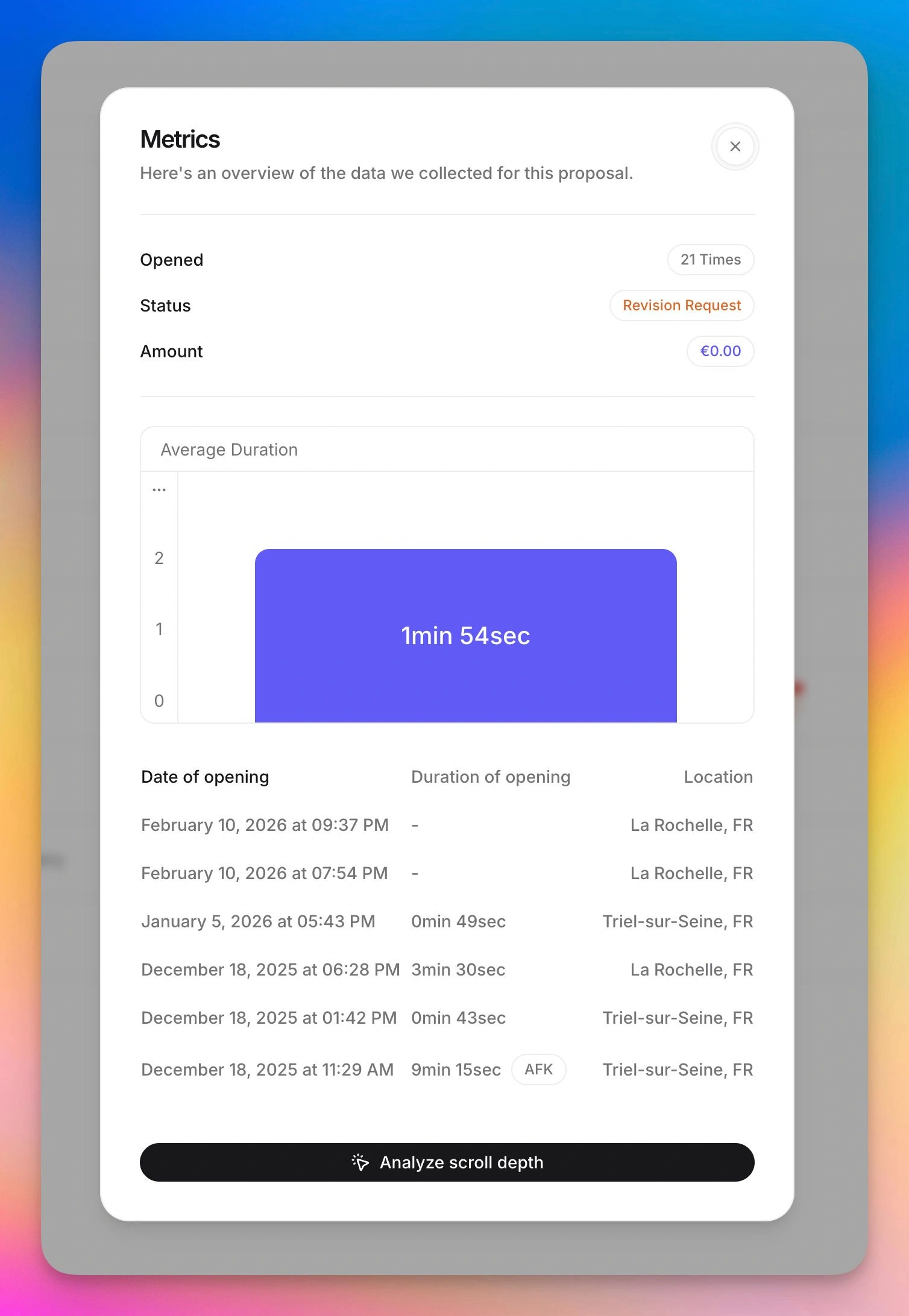
Proposal tracking is the process of monitoring how prospects interact with your proposals after you send them. Instead of guessing, you get concrete data: open timestamps, page-by-page reading time, scroll depth, number of views, and forwarding activity.
The follow-up problem in numbers
Research consistently shows that 80% of sales require at least five follow-ups to close. Yet 44% of salespeople give up after a single follow-up attempt. The gap between these two numbers represents thousands of deals lost every year, not because the proposal was bad, but because the follow-up was.
Without proposal tracking software, you have no signal to guide your timing. You send a follow-up three days after the proposal, hoping your client is ready. But maybe they only opened it that morning. Or maybe they have not opened it at all. Or maybe they read it carefully, shared it with their CFO, and are waiting for budget approval. Each of these scenarios calls for a different response, and without data, you are guessing.
What tracking actually shows you
Modern proposal tracking tools capture several layers of engagement data. The first layer is basic: did the client open the proposal, and when? The second layer goes deeper: which sections did they read, how long did they spend on pricing versus the project scope, and did they scroll all the way to the terms? The third layer reveals intent: did they come back multiple times, did they forward the link to someone else, and are multiple people from the same company viewing the proposal?
Each layer gives you a clearer picture of where your prospect stands in their decision process.
The 6 Proposal Tracking Metrics That Actually Matter
Not all tracking data is equally useful. Here are the metrics that should drive your follow-up strategy.
1. Open rate and first open time
The most basic metric: did your client open the proposal? Industry averages for proposal analytics show that well-sent proposals get opened about 60% of the time. High-performing teams push that above 80%. If your open rate is below 50%, the problem is likely in your delivery method or subject line, not your proposal content.
The first open time tells you when your client actually looked at the proposal. If you sent it Monday morning and they opened it Wednesday afternoon, your follow-up on Tuesday was premature. Tracking this metric helps you calibrate your timing.
2. Time spent per section
This is where proposal tracking gets powerful. Knowing that your client spent 4 minutes on the pricing page but only 30 seconds on the methodology section tells you exactly what they care about. If they linger on pricing, your follow-up should address value and ROI. If they re-read the scope section multiple times, they may have questions about deliverables.
This metric transforms generic follow-ups ("Just checking in to see if you had any questions") into specific, valuable conversations ("I noticed you spent some time on the pricing options. Happy to walk you through how option B compares to option A for your timeline").
3. Total views and repeat visits
A single view might mean a quick scan. Three or four views over a week means active consideration. If your prospect keeps coming back to the proposal, they are engaged but may need something more to make their decision. This is the moment for a well-timed call, not an email.
Proposal analytics that show repeat visits are especially valuable because they indicate that the prospect is moving through an internal evaluation process. Each visit may correspond to a conversation with a different stakeholder.
4. Completion rate
Did your client read the whole proposal or abandon it halfway through? If your proposal tracking software shows that most clients drop off after page 3 of a 10-page proposal, you have a structural problem. Your proposal may be too long, the most important information may be buried too deep, or the middle sections may lack relevance.
Completion rate data, aggregated across all your proposals, helps you improve your template over time. Move the high-interest sections earlier, cut the sections that get skipped, and keep the pricing visible without requiring a long scroll.
5. Forwarding and multi-viewer activity
When your contact forwards the proposal to a colleague, it is one of the strongest buying signals in B2B sales. It means your proposal has passed an initial screening and is now being evaluated by the decision-making group. Some proposal tracking tools detect this by noting views from different IP addresses, locations, or devices on the same proposal link.
When you see multi-viewer activity, adapt your follow-up accordingly. Ask your contact who else is involved in the decision. Offer to set up a brief call with the wider team. Provide additional materials that address common concerns from different stakeholders (technical specs for the CTO, ROI projections for the CFO).
6. Time to signature
The elapsed time between proposal delivery and signature (or rejection) is a lagging metric, but it is essential for benchmarking. Tracking this across all your proposals reveals your average sales cycle length and helps you identify outliers. A proposal that has been open for 3 weeks without a decision may need a different approach than one that is still in its first week.
How Proposal Tracking Works: Behind the Scenes
If you have ever wondered how proposal tracking software captures this data, the mechanism is straightforward.
Link-based tracking
The most reliable tracking method uses unique links. Instead of sending a PDF attachment, you send your client a link to a web-based proposal. When they click the link, the tracking system logs the visit, records the time spent on each section, and monitors their navigation through the document.
This approach is fundamentally different from email open tracking (which relies on invisible pixel images and is blocked by most email clients in 2026). Link-based tracking works because the prospect is actively viewing a web page, and web pages can measure engagement natively and accurately.
The bot traffic problem
One challenge with proposal tracking is distinguishing real views from automated ones. Corporate email security systems (like Mimecast, Proofpoint, and Microsoft Defender) automatically visit links in emails to scan for threats. If your tracking tool counts these automated clicks as real views, your data is polluted.
The best proposal tracking software tools filter bot traffic using multiple signals: user agent analysis, interaction patterns (bots do not scroll or spend variable time on sections), and behavioral heuristics. When evaluating tools, ask specifically how they handle bot detection. Inaccurate tracking data is worse than no tracking at all.
PDF attachment limitations
If you still send proposals as PDF email attachments, your ability to track business proposals is extremely limited. Some email tools can tell you whether the email was opened (unreliable in 2026 due to privacy features), but they cannot tell you whether the PDF was downloaded, opened, or read. There is no page-by-page data, no time tracking, and no forwarding detection.
This is the single biggest reason to move from PDF proposals to web-based proposals. The tracking capabilities alone justify the switch for any team that takes their proposal follow-up process seriously.
How to Use Tracking Data for Better Follow-Ups
Data without action is just noise. Here is how to turn proposal analytics into a concrete proposal follow-up strategy.
Scenario 1: Opened but not read thoroughly
Your tracking shows the client opened the proposal but spent less than a minute on it. They may have been interrupted, or the proposal did not grab their attention immediately.
Action: Send a brief, low-pressure follow-up 24-48 hours later. Reference a specific highlight from the proposal that is most relevant to their stated need. Keep it to 3 sentences. The goal is to re-engage, not to pressure.
Scenario 2: Read carefully, no response
Your client spent significant time on multiple sections, especially pricing, and may have returned for a second view. But they have not responded.
Action: This is a high-intent prospect who likely has questions or is waiting for internal approval. Call them directly (not email). Reference what you noticed they focused on: "I wanted to see if you had any questions about the scope of phase 2 since I know that part of the project requires coordination with your development team."
Scenario 3: Forwarded to others
Multiple viewers from the same organization have opened the proposal. Your contact has shared it internally.
Action: Acknowledge the buying process. Email your contact and offer to provide a summary document for the decision group, or propose a short call with all stakeholders. Provide materials that address different concerns (ROI sheet, technical FAQ, case study from a similar client).
Scenario 4: Never opened
Five days have passed and the proposal shows zero views. Your client has not opened it.
Action: The issue is likely the delivery, not the content. Re-send with a different subject line. Try a different channel (LinkedIn message, phone call). Consider whether the timing was bad (end of quarter, vacation period). Do not assume lack of interest until you have confirmed they actually received and saw the proposal.
Scenario 5: Opened, spent time on pricing, no return
Your client viewed the proposal once, spent most of their time on the pricing section, and has not returned.
Action: Price concern is the most likely objection. Your follow-up should proactively address value. Share a relevant case study or ROI example. If your proposal includes multiple pricing tiers, highlight the flexibility.
Best Proposal Tracking Tools in 2026
Several proposal tracking software options are available, each with different strengths.
Propal.io
Propal.io turns every proposal into a tracked web page with real-time proposal analytics. You see when your client opens the proposal, which sections they read, how long they spend on each part, and whether they share the link. The tracking is built into the proposal itself, so there is no separate setup. Combined with e-signatures and integrated payments, Propal.io covers the entire post-send workflow.
Best for: agencies and freelancers who want proposal tracking built into their proposal creation tool without adding another platform to their stack.
Try Propal.io free and start tracking your proposals in real time.

Proposify
Proposify offers detailed proposal analytics with its Metrics dashboard, showing open rates, completion rates, and time-per-section data across all proposals. The tracking works well for sales teams that need aggregate data to improve their proposal templates over time. Insights into which Proposify alternatives offer better tracking can help you choose the right tool.
Best for: structured sales teams that need proposal management dashboards and aggregate performance data.
PandaDoc
PandaDoc provides document analytics showing who viewed your proposal, how long they spent on each section, and whether they forwarded it. The tracking integrates with CRM systems like Salesforce and HubSpot, so engagement data flows directly into your pipeline. For teams already using PandaDoc for documents, explore how it compares to other PandaDoc alternatives.
Best for: mid-size sales teams that need proposal tracking integrated with their CRM and document management workflow.
Better Proposals
Better Proposals tracks opens, time spent, and provides notifications when clients view your proposal. The tracking is straightforward and well-suited to freelancers and small teams who want actionable alerts without complex dashboards.
Best for: freelancers and small agencies who want simple, actionable tracking without enterprise complexity.
GetAccept
GetAccept tracks engagement across its digital sales rooms, including proposals, contracts, and shared content. The tracking extends beyond individual documents to the entire deal room, showing which assets prospects interact with most. See how it compares in our guide to Qwilr alternatives.
Best for: B2B sales teams running complex, multi-stakeholder deal cycles.
Setting Up Proposal Tracking: A Step-by-Step Guide
Getting started with proposal tracking does not require a complex implementation.
Step 1: Choose a web-based proposal tool. The tracking capabilities described above require web-based proposals, not PDF attachments. Select a tool that creates trackable web links for each proposal.
Step 2: Create your first tracked proposal. Import your existing proposal content into the tool. Most platforms offer template libraries and drag-and-drop editors that make this quick.
Step 3: Send via tracked link. Share the unique link with your prospect via email. Some tools integrate directly with your email client and add the link automatically.
Step 4: Monitor the dashboard. Check your proposal analytics when you receive notifications. Focus on the metrics that matter: first open time, time per section, and repeat visits.
Step 5: Adapt your follow-up. Use the scenarios described above to tailor your response. The goal is not to stalk your prospect but to provide value at the right moment.
Step 6: Iterate on your template. After 10-20 tracked proposals, review the aggregate data. Which sections get the most attention? Where do clients drop off? Use these insights to improve your proposal management process.
Conclusion
Proposal tracking is not a nice-to-have feature. It is the difference between following up with purpose and following up blind. In a market where 80% of deals require multiple follow-ups, knowing exactly when and how your prospect engaged with your proposal gives you a decisive advantage.
The shift from PDF attachments to web-based proposals makes track business proposals possible at a level of detail that was unimaginable a few years ago. Page-by-page analytics, real-time notifications, forwarding detection, and engagement scoring turn your proposal from a one-way document into a two-way conversation.
If you are ready to stop guessing and start knowing what happens after you hit send, Propal.io provides built-in proposal tracking with every proposal you create. Real-time analytics, e-signatures, and integrated payments in one tool designed for agencies and freelancers.
Related resources:
.webp)